








1
/
of
7
DUBAI LOOKA
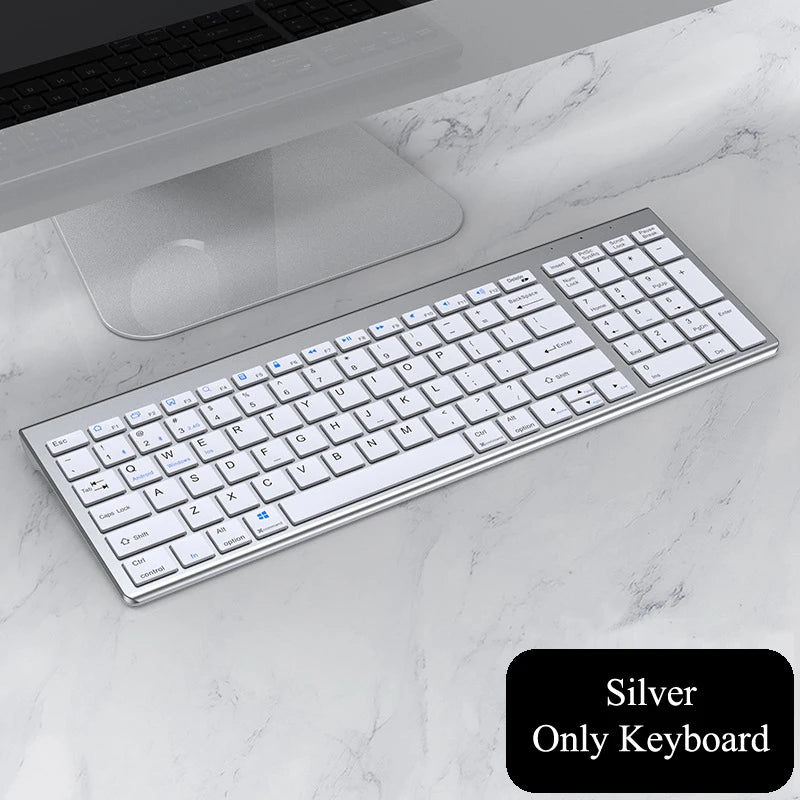
wireless-bluetooth-keyboard-three-mode-silent-full-size-keyboard-and-mouse-combo-set-for-notebook-laptop-desktop-pc-tablet
wireless-bluetooth-keyboard-three-mode-silent-full-size-keyboard-and-mouse-combo-set-for-notebook-laptop-desktop-pc-tablet
Regular price
Dhs. 111.00 AED
Sale price
Dhs. 111.00 AED
Dhs. 23.00 AED
Unit price
/
per
498 in stock
Couldn't load pickup availability
-
Delivered in 2–4 weeks Shipped from our overseas partners straight to your door. We email you the moment it leaves the warehouse.
-
Free delivery across the UAE The price you see is the price you pay — no delivery charge at checkout. Read our returns policy.
-
Licensed Dubai business DULOOKA ONLINE SELLER, licensed by Dubai Economy & Tourism. Secure checkout.
Description
Description
SPECIFICATIONS
Brand Name: xummen
XUMMEN Model: 109
Operation Style: Capacitive
Language: English
Type: Bluetooth-compatible Wireless
Application: Desktop
Application: Laptop
Application: Tablet
Keyboard Standard: 109 Keys
Style: Standard
Certification: CE
Interface Type: USB
Interface Type: bluetooth
Interface Type: Bluetooth/USB
Connection with computer: USB and Bluetooth
Color: Black/Gray/Silver
Apply to: for Notebook Laptop Desktop PC Tablet
Please note:
1.The keyboard is in English, but the store can provide stickers in Spanish, Russian, French, Hebrew, Arabic, and Portuguese, but you must make a note when placing an order, contact customer service, thank you!
Description of the two connection methods:
一. USB2.4G connection:
1. Flip the power switch to ON to turn on the keyboard
2. Insert the USB into the computer, press and hold the button FN+~, the connection is successful
二. Bluetooth connection:
1. Flip the power switch to ON to turn on the keyboard
2. Turn on your device's Bluetooth to enter the search state (system settings - turn on Bluetooth - search and add)
2. Press and hold the key FN+1 or FN+2 or FN+3 on the keyboard, the light flashes, the device will display "O50 keyboard BT", you can click to connect successfully.
三. Multi-device connection:
1.FN+1: Connect to Bluetooth device 1
2.FN+2: connect to bluetooth device 2
3.FN+3: connect to bluetooth device 3
4.FN+~: connect to USB, 2.4G wireless reception
5. Press FN+1/2/3/~ alone to switch the paired devices
6.FN+1/2/3, press and hold for 3 seconds in combination: flashing light, can start the searched state (connect a new device)
Additional instructions:
1. For the first connection, you need to switch the keyboard to the corresponding system
2. Failure to switch may cause the function keys to not be used normally!
3. The keyboard distance is 5-10 meters, and the language environment factors of different devices are related to the distance.
troubleshooting:
1. When the keyboard cannot be searched, please try to turn on the bluetooth on the device to search again
2. When the keyboard is turned on and there is no indicator light, try to charge the keyboard.
3. After connecting to other devices, go back to the original device again, you need to delete the old record before you can connect
4. When the pairing fails, you need to delete the failed pairing record, and then perform the second pairing
Share

Regular price
Dhs. 111.00 AED
Sale price
Dhs. 111.00 AED
Dhs. 23.00 AED
Unit price
/
per